Normalization processor
The normalization-processor is a search phase results processor that runs between the query and fetch phases of search
execution. It intercepts the query phase results and then normalizes and combines the document scores from different
query clauses before passing the documents to the fetch phase.
Score normalization and combination
Many applications require both keyword matching and semantic understanding. For example, BM25 accurately provides relevant search results for a query containing keywords, and neural networks perform well when a query requires natural language understanding. Thus, you might want to combine BM25 search results with the results of a k-NN or neural search. However, BM25 and k-NN search use different scales to calculate relevance scores for the matching documents. Before combining the scores from multiple queries, it is beneficial to normalize them so that they are on the same scale, as shown by experimental data.
Query then fetch
Lucenia supports two search types: query_then_fetch and dfs_query_then_fetch. The following diagram outlines the
query-then-fetch process, which includes a normalization processor.
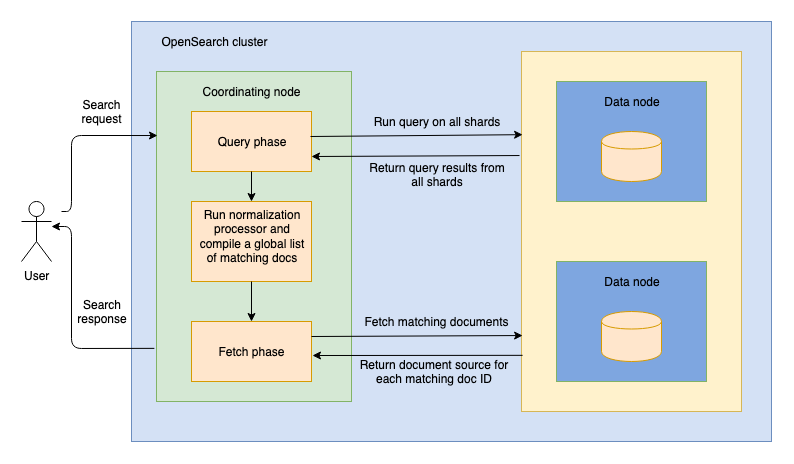
When you send a search request to a node, the node becomes a coordinating node. During the first phase of search, the
query phase, the coordinating node routes the search request to all shards in the index, including primary and replica
shards. Each shard then runs the search query locally and returns metadata about the matching documents, which includes
their document IDs and relevance scores. The normalization-processor then normalizes and combines scores from
different query clauses. The coordinating node merges and sorts the local lists of results, compiling a global list of
top documents that match the query. After that, search execution enters a fetch phase, in which the coordinating node
requests the documents in the global list from the shards where they reside. Each shard returns the documents' _source
to the coordinating node. Finally, the coordinating node sends a search response containing the results back to you.
Request fields
The following table lists all available request fields.
| Field | Data type | Description |
|---|---|---|
normalization.technique | String | The technique for normalizing scores. Valid values are min_max and l2. Optional. Default is min_max. |
combination.technique | String | The technique for combining scores. Valid values are arithmetic_mean, geometric_mean, harmonic_mean, and bayesian (introduced in 0.12.0). Optional. Default is arithmetic_mean. |
combination.parameters.weights | Array of floating-point values | Specifies the weights to use for each query. Valid values are in the [0.0, 1.0] range and signify decimal percentages. The closer the weight is to 1.0, the more weight is given to a query. The number of values in the weights array must equal the number of queries. The sum of the values in the array must equal 1.0. Optional. If not provided, all queries are given equal weight. |
tag | String | The processor's identifier. Optional. |
description | String | A description of the processor. Optional. |
ignore_failure | Boolean | For this processor, this value is ignored. If the processor fails, the pipeline always fails and returns an error. |
Bayesian score combination
The bayesian combination technique was introduced in Lucenia 0.12.0.
Instead of taking a plain average of the normalized subquery scores, the bayesian technique performs
probabilistic log-odds fusion. Each normalized score is treated as a calibrated probability that the document
is relevant to that subquery. Every probability is mapped into log-odds space, combined with the configured
per-subquery weights, and then mapped back to a final score in the [0.0, 1.0] range.
Combining in log-odds space (rather than averaging the raw scores) keeps the magnitude information carried by
each score and rewards agreement between independent signals. When several subqueries independently agree
that a document is relevant (for example, a BM25 match and a k-NN or neural match), the fused score is pushed
higher; the more matching signals agree, the higher the confidence in the result. Subqueries that did not match
a given document are skipped rather than penalizing the document, and a document that no subquery matched
receives a score of 0.0.
The bayesian technique is compatible with the min_max and l2 normalization techniques.
Parameters
The bayesian technique accepts the following parameter.
| Parameter | Data type | Description |
|---|---|---|
weights | Array of floating-point values | Specifies the weight to apply to each subquery. The number of values in the array must equal the number of subqueries, and the weights are applied in the log-odds space before fusion. Optional. If not provided, all subqueries are given equal weight. |
Example
The following combination block configures a normalization-processor to use the bayesian technique with
per-subquery weights:
"combination": {
  "technique": "bayesian",
  "parameters": {
    "weights": [
      0.3,
      0.7
    ]
  }
}
Example
The following example demonstrates using a search pipeline with a normalization-processor.
Creating a search pipeline
The following request creates a search pipeline containing a normalization-processor that uses the min_max
normalization technique and the arithmetic_mean combination technique:
PUT /_search/pipeline/my-search-pipeline
{
  "description": "Post processor for hybrid search",
  "phase_results_processors": [
    {
      "normalization-processor": {
        "normalization": {
          "technique": "min_max"
        },
        "combination": {
          "technique": "arithmetic_mean",
          "parameters": {
            "weights": [
              0.3,
              0.7
            ]
          }
        }
      }
    }
  ]
}
Using a search pipeline
Provide the query clauses that you want to combine in a hybrid query and apply the search pipeline created in the
previous section so that the scores are combined using the chosen techniques:
GET /my-index/_search?search_pipeline=my-search-pipeline
{
  "query": {
    "hybrid": {
      "queries": [
        {
          "match": {
            "text": {
              "query": "horse"
            }
          }
        },
        {
          "match": {
            "description": {
              "query": "wild west"
            }
          }
        }
      ]
    }
  }
}
Search tuning recommendations
To improve search relevance, we recommend increasing the sample size.
If the hybrid query does not return some expected results, it may be because the subqueries return too few documents.
The normalization-processor only transforms the results returned by each subquery; it does not perform any additional
sampling. During our experiments, we used nDCG@10 to measure
quality of information retrieval depending on the number of documents returned (the size). We have found that a size in
the [100, 200] range works best for datasets of up to 10M documents. We do not recommend increasing the size beyond the
recommended values because higher size values do not improve search relevance but increase search latency.